MSI MAG Z890 Tomahawk Wifi II motherboard review: Loses features from the original, but shaves a few dollars off the price
Publié il y a 5 h · d'après Tom's Hardware
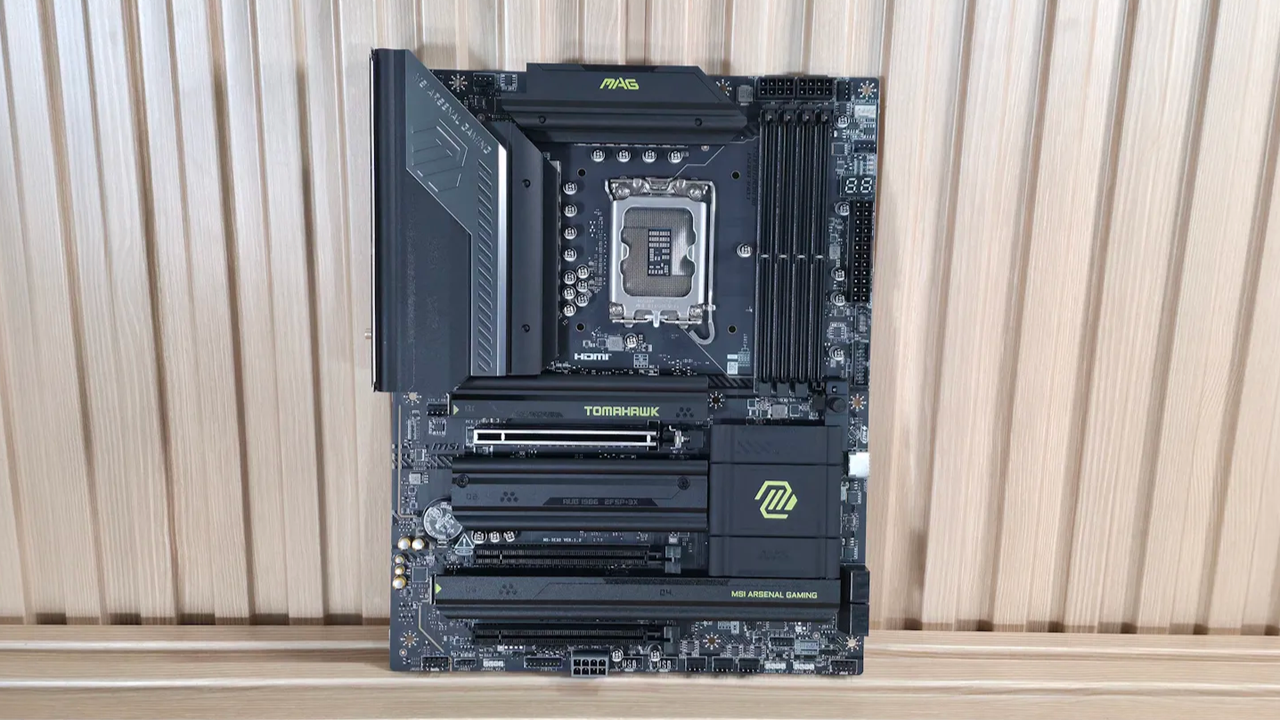
The latest board from the budget side of the Z890 lineup to land on our test bench is the MSI MAG Z890 Tomahawk Wi-Fi II. This updated Intel board is a streamlined revision of the original, optimized for Intel’s Core Ultra 200S Plus processors. It retains the same aesthetic, core power delivery, and DIY-friendly features, but has two connectivity downgrades: a single TB4 port (down from two) and reduced Wi-Fi 7 speeds. It’s a decent budget motherboard; it’s just that the feature-reduction refresh is a bit curious to me. Currently listed at $229.99 , the Tomahawk Wi-Fi II costs roughly the same as the original Z890 Tomahawk . Aside from the two downgrades, it also tweaks some header locations and, minimally, the aesthetics. Hardware-wise, you still get nearly everything from the original, including capable power delivery (19 phases, 90A MOSFETs), two Type-C ports (one TB4/40 Gbps) and seven Type-A USB ports on the rear IO. There's also Wi-Fi 7 and 5 GbE networking, a last-gen audio solution, along with MSI’s EZ DIY and EZ Overclock features. Performance on the Tomahawk II was good overall with the MSI Performance setting, landing somewhere in the middle among the boards tested. In short, it’s competent across a wide variety of PC activities, including gaming, rendering, encoding, and office-type work. There’s nothing to worry about on the performance front. Below, we’ll examine the board's performance and other features to determine whether it deserves a spot on our list of the best motherboards . But before we share test results and discuss details, here are the specifications from MSI. Specifications of the MSI MAG Z890 Tomahawk Wifi II Socket LGA 1851 Chipset Z890 Form Factor ATX Voltage Regulator 19 Phase (16x 90A SPS MOSFETs for Vcore) Video Ports (1) HDMI (v2.1) (1) Thunderbolt 4 Type-C (DP 2.1) USB Ports (1) TB4 Type-C (40 Gbps) (1) USB 3.2 Gen 2 Type-C (10 Gbps) (3) USB 3.2 Gen 2 (10 Gbps) (4) USB 3.2 Gen 1 (5 Gbps) Network Jacks (1) 5 GbE Audio Jacks (2) Analog + SPDIF Legacy Ports/Jacks ✗ Other Ports/Jack ✗ PCIe x16 (1) v5.0 (x16) (2) v4.0 (x4) PCIe x8 ✗ PCIe x4 ✗ PCIe x1 ✗ DIMM Slots (2) DDR5-9200+ MT/s (OC), 256GB Capacity M.2 Sockets (1) PCIe 5.0 x4 (128 Gbps) / PCIe (up to 80mm) (1) PCIe 4.0 x4 (64 Gbps) / PCIe (up to 110mm) (1) PCIe 4.0 x4 (64 Gbps) / PCIe (up to 80mm) (1) PCIe 4.0 x4 (64 Gbps) / PCIe/SATA (up to 80mm) Supports RAID 0/1/5 SATA Ports (4) SATA3 6 Gbps Supports RAID 0/1/5/10 USB Headers (1) USB v3.2 Gen 2x2 (20 Gbps) Type-C (USB PD 27W) (1) USB v3.2 Gen 1 (5 Gbps) (2) USB v2.0 (480 Mbps) Fan/Pump Headers (8) 4-Pin (Accepts PWM and DC) (1) ARGB+Fan+USB2.0 header RGB Headers (3) 3-pin ARGB headers (1) 4-pin RGB LED strip header Diagnostics Panel (1) EZ Debug LED (1) EZ Digi-Debug LED Internal Button/Switch ✗ SATA Controllers ✗ Ethernet Controller(s) (1) Killer E5000 Realtek RTL8125 (2.5 GbE) Wi-Fi / Bluetooth Intel MediaTek Wi-Fi 7 - Up to 2.9 Gbps, 160 MHz, 6 GHz, 5.8 GHz, BT 5.4 USB Controllers Genesys Logic GLG3253 HD Audio Codec Realtek ALC1200P DDL/DTS ✗ / ✗ Warranty 3 Years Inside the Box Inside the box, MSI includes a few accessories to help get your system running, hopefully, without a trip to the store. You get the typical array of guides and EU notices, a 1 to 3 EZ Conn-Cable (V2), Wi-Fi antenna, EZ M.2 clip remover, (2) EZ M.2 Clips II, and two SATA cables. There isn’t much here, but it is similar to other budget boards. Design and Features of the Tomahawk Wifi II Future Future Future Future Future Future Future Looking at the Z890 Tomahawk II, it’s tough to discern any aesthetic changes versus the original. It sports an all-black 6-layer, server-grade PCB design with black heatsinks all around. There are bright yellow/green branding accents on the chipset heatsink, the primary M.2 heatsink (for which I wish to see a larger one for the PCIe 5.0 M.2 socket underneath), and the top VRM heatsink. As for RGB lighting, the Tomahawk II, like the original, doesn’t include RGB lighting, though it d
Cet article est un résumé rédigé par La Config. Pour aller plus loin, tu peux lire la publication d'origine :
Lire l'article original sur Tom's HardwareEnvie de monter ou mettre à jour ton PC ?
Notre conseiller te compose une config adaptée à ton budget.

